Paper Bag Making Machine with Printing: 7 Essential Check
Production guide · SAGLIN Machinery
How to compare two production routes using your artwork, order mix and saleable output.
What Does a Paper Bag Making Machine with Printing Do?
A printed bag brings two jobs together: reproducing the artwork and forming a usable package. When researching a paper bag making machine with printing, it helps to separate those jobs before deciding how closely they should be connected.
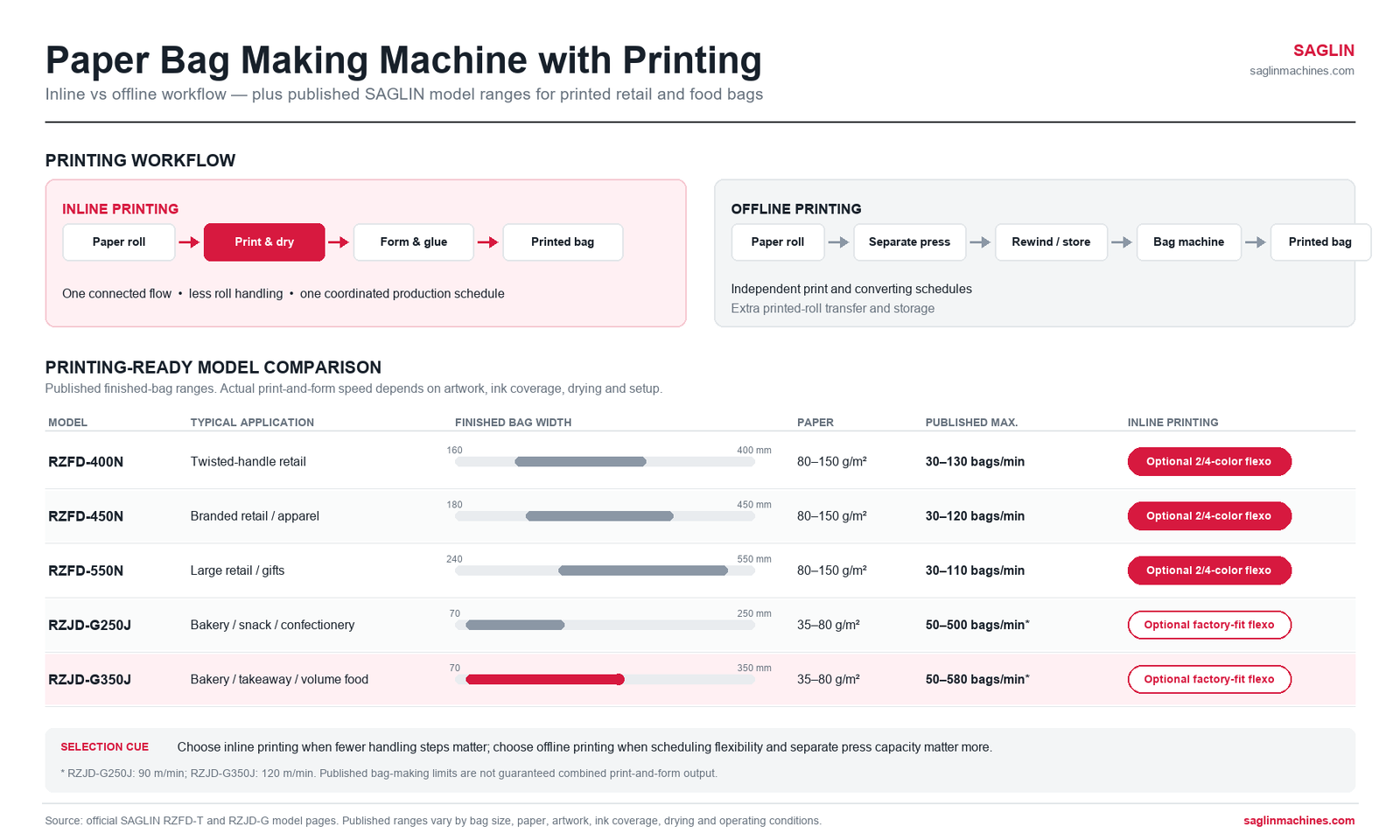
On an inline flexo printing configuration, paper unwinds from a roll, passes through printing and drying, then enters the bag forming sections. The precise station arrangement depends on the equipment. The finished bags leave the line with the design already on their panels.
Offline printing uses a separate press. In a typical roll fed workflow, printed paper is rewound, stored or transferred, and subsequently loaded onto the bag machine. Printing pre-cut sheets for luxury bag conversion is another route, with different equipment and material requirements.
Here, a paper bag making machine with printing is compared with an offline printing route for roll fed kraft bag production. Printing directly onto finished bags is a separate process and should not be treated as the same workflow.
Inline and Offline: The Main Production Tradeoffs
Before selecting a paper bag making machine with printing, compare how paper moves, how jobs are scheduled and what happens when either process stops.
| Question | Inline printing | Offline printing |
|---|---|---|
| How does stock move? | Printing and forming share a continuous web path | Printed stock moves between separate operations |
| How are jobs scheduled? | Print and bag schedules are linked | Printing can be scheduled ahead of conversion |
| What happens during a stop? | A printing stop can interrupt bag output | Printed inventory may allow conversion to continue |
| What must be compared? | Combined setup, drying and forming performance | Press setup, rewinding, handling and bag setup |
Where Inline Printing Can Fit Well
A paper bag making machine with printing may remove an intermediate rewind and transfer step for repeat branded kraft paper bags with familiar artwork and relatively stable bag dimensions. Combining printing and forming may remove an intermediate rewind and transfer step, depending on the alternative workflow.
The benefit depends on both operations working well together. If printing requires a slower speed than bag forming, the whole line must accommodate that limit. Equally, frequent changes to bag size can leave the printing section waiting during adjustment.
Where Offline Printing Can Fit Well
An offline workflow can supply a paper bag making machine with printing while keeping printing and forming on separate schedules. This can suit a converter with several bag machines, frequent artwork changes or a press that also serves other products.
That flexibility comes with work. Printed rolls need identification, storage and handling. Their width, winding direction and repeat must match the receiving machine. Inventory also ties up money, especially when customers revise designs after stock has been printed.
Let the Artwork Define the Printing Requirements
Start with an approved design, not a colour count on a brochure. Two spot colours for a bakery logo present a different challenge from fine text, gradients and tightly registered multicolour artwork.
Ask the supplier to test the paper bag making machine with printing using your representative design on the intended stock. Judge solid coverage, small text, alignment, rubbing resistance and the appearance of folds through printed areas. Brown kraft and white kraft can make the same ink look different.
Neither workflow guarantees better print quality by itself. Plate preparation, ink control, paper behaviour, registration and drying all matter. BOBST’s technical overview of flexographic printing discusses these interacting factors.
Registration Must Continue into Bag Forming
Print registration aligns colours with one another. Print-to-bag registration positions the artwork relative to cutting, folds and bag panels. These are related tasks, but they are not interchangeable.
Give both suppliers the bag drawing and artwork position. Agree on the print repeat, reference mark location and acceptance tolerances. Confirm that the bag machine can read the printed stock and maintain the required positioning.
On a paper bag making machine with printing, a shared web path can simplify transfer between printing and forming, but it does not eliminate registration errors. Offline production adds winding and refeeding variables that also need control.
Drying Is Part of the Usable Speed
Ink must reach a suitable condition before later handling and conversion. Large printed areas or a demanding ink-and-paper combination may require more drying capacity than a light logo.
For an inline paper bag making machine with printing, check the proposed speed using your actual ink coverage. For offline production, also assess the printed roll after rewinding and storage. Look for transfer, smearing or sticking between layers.
Ask how drying performance is demonstrated and what utilities the system needs. Increasing temperature is not a complete solution; the paper, ink and equipment limits all need to be respected.
Where SAGLIN Equipment Fits into the Comparison
Choose a paper bag making machine with printing for a specific bag format, paper range and artwork requirement. In our range, shopping carriers and lightweight food bags use different machine families. Check the bag first, then specify the printing arrangement.
RZFD-T N Models: Printed Twisted-Handle Carriers
For shopping carriers, a paper bag making machine with printing must match the handle format, bag width, paper weight and colour requirements.
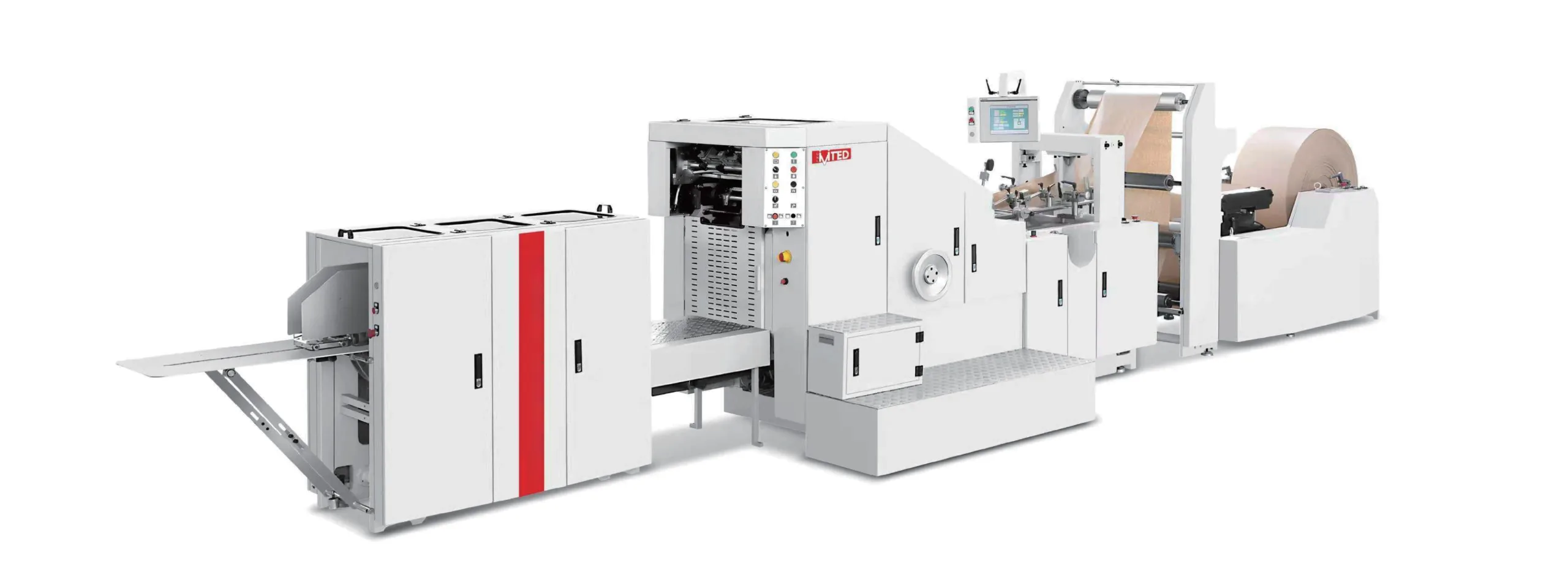
The SAGLIN-RZFD-T twisted-rope handle series includes the printing-ready RZFD-400N, RZFD-450N and RZFD-550N. Their inline flexographic printing unit is an optional configuration, with two- or four-colour options listed on the product page.
As a format example, the RZFD-550N has a published bag width range of 240–550 mm and paper range of 80–150 g/m². Those limits help narrow the equipment choice, but the printed stock, repeat and required quality still need to be assessed together.
Ask for a paper bag making machine with printing demonstration using the proposed flexographic unit, paper and artwork. A bag-forming demonstration alone does not establish combined printing and forming output. If your order mix requires both handle styles, also compare the RZFD-TF twin-handle series and confirm printing availability for the selected configuration.
RZJD-G: Printed Bags for Food and Bakery Formats
For lightweight food packaging, a paper bag making machine with printing must be evaluated with the actual paper and ink coverage.
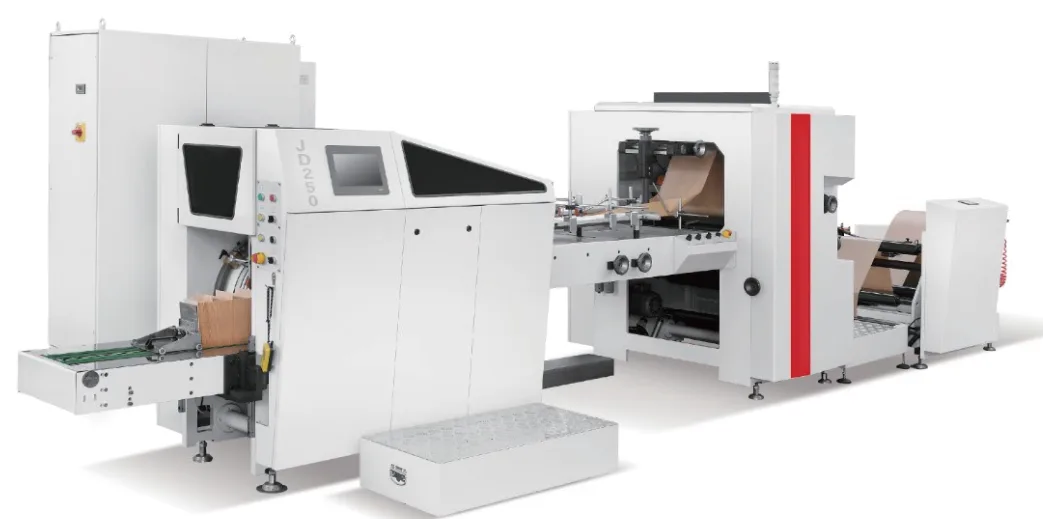
The RZJD-G food bag series lists optional inline flexographic printing. The RZJD-G350J has a published bag width range of 70–350 mm and paper range of 35–80 g/m², making it a different material comparison from the shopping bag example above.
For a bakery logo, trial the paper bag making machine with printing on the actual lightweight stock, ink coverage and required drying conditions. Compare accepted printed bags with accepted bags from a preprinted-roll workflow. This keeps the decision grounded in the job rather than the machine’s maximum bag-making rate.
Send representative artwork and bag dimensions when discussing either route. The useful proposal is one that identifies the machine, printing option and conditions used to assess output.
Compare Accepted Bags per Shift
Measure a paper bag making machine with printing over a representative shift rather than at its short-term maximum speed. Press speed is often expressed in metres per minute, while bag output is expressed in bags per minute, so comparing those numbers directly gives a misleading picture.
Use a representative shift instead. Include paper loading, print setup, colour changes, bag adjustments, cleaning and planned inspections. Record accepted bags separately from everything produced.
For offline printing, account for both departments’ time. A fast press does not improve deliveries if the bag machine is waiting for suitable rolls. Conversely, a printed-stock buffer may help when production schedules change.
Calculate Cost per Thousand Accepted Bags
Compare the total cost of a paper bag making machine with printing with the full cost of the offline route. Use the same order basket and include paper, ink, plates, energy, labour, setup waste, rejects, handling and allocated equipment cost. Offline estimates should include rewinding and storage where those steps are required.
Divide total job cost by accepted bags, then multiply by 1,000. This avoids making a route look economical simply because its rejected output was counted as saleable production.
Use the same assumptions for both options. An existing press with spare capacity changes the calculation, but its operator time and consumables still have a cost. A new integrated line needs a realistic utilisation estimate.
Match the Route to Your Order Book
The right paper bag making machine with printing should deliver consistent accepted bags across representative orders. Are most jobs repeats or new designs? Can printing and forming comfortably share a schedule? Do you already have suitable printing capacity?
For long repeat jobs, trial the integrated route against your present process. For many short jobs, measure changeover time carefully. For mixed products across several machines, examine whether a shared press can supply them without becoming a bottleneck.
Include disruption in the comparison. Discuss what happens if the printer stops, the forming section needs service or a customer brings an urgent design change. The value of scheduling flexibility becomes clearer in these situations.
What to Request in a Supplier Trial
A supplier trial for a paper bag making machine with printing should reproduce the proposed paper, artwork, print coverage and finished bag format.
- Your paper grade, representative artwork and finished bag dimensions.
- A stated print repeat, colour requirement and approved reference sample.
- Recorded setup time, sustained operating speed and accepted output.
- Checks for registration, drying, rubbing and finished bag quality.
- A written list of included equipment, utilities and optional modules.
SAGLIN’s paper bag machine range includes configurations with optional inline flexo printing. Check the specific model and proposed artwork together. Our paper bag production line guide explains the wider configuration choices.
A well-specified paper bag making machine with printing should support a workflow that fits your orders, operators and quality requirements. The arrangement with fewer steps is attractive only when those steps deliver consistent accepted bags.
Questions and Answers
Is Inline Printing Always Cheaper?
No. It may reduce intermediate handling, but its economics depend on order length, setup time, utilisation and waste. Compare total cost for the same jobs under both routes.
Can a Paper Bag Machine Use Preprinted Rolls?
A compatible configuration can, provided roll dimensions, winding, repeat and registration requirements match. Confirm those details before ordering printed stock.
Does Offline Printing Produce Better Quality?
Not automatically. Either route needs suitable paper, ink, plates, registration and drying. Compare approved samples made with your artwork rather than judging the process name.
Can Inline Printing Be Added Later?
Retrofit feasibility depends on the machine, controls, available space and drying requirements. Obtain a technical assessment for the exact installation before budgeting for an upgrade.
How Many Printing Colours Do I Need?
Use the artwork and required quality to decide. Confirm the number of stations, any additional treatments and whether the proposed press can reproduce the approved design.
How Do I Choose a Paper Bag Making Machine with Printing?
A paper bag making machine with printing should be selected by comparing the bag format, paper range, artwork, colour requirements, drying needs, order length and accepted output. Request a production trial using the proposed configuration and representative materials.